


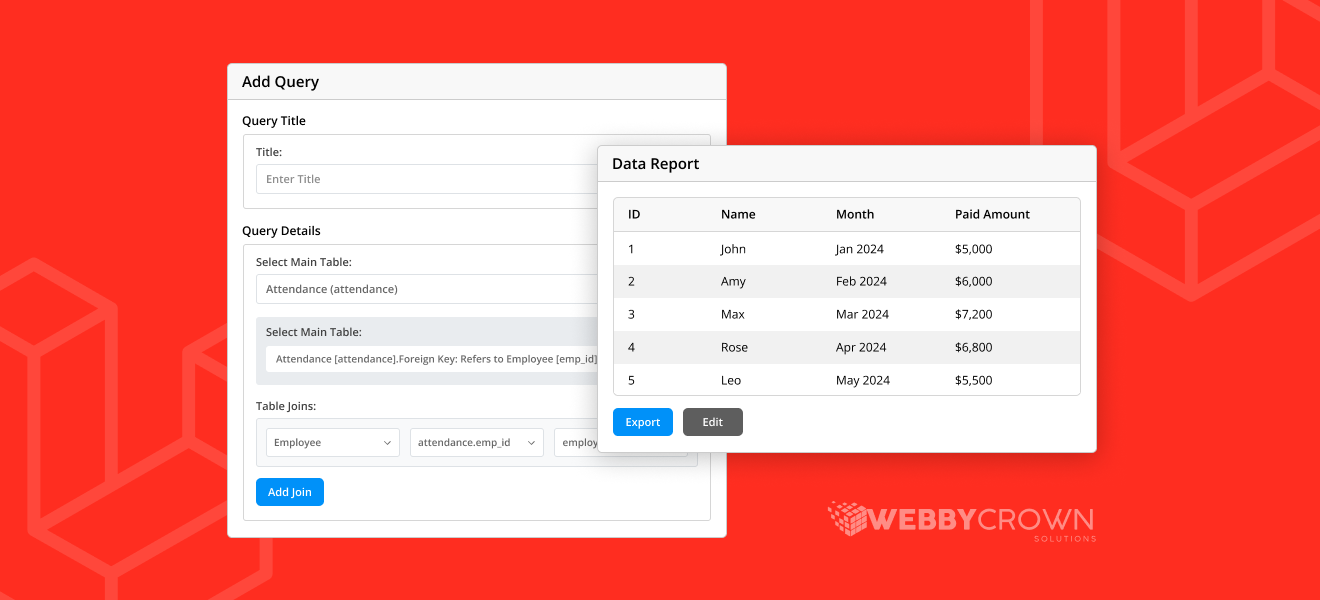
Now you can generate dynamic reports and complex SQL queries in your Laravel project with Laravel Query Builder Package by WebbyCrown. This package is for technical and non technical users so it’s suitable for all kind of companies and businesses. It’s compatible with multiple platforms and databases including Oracle and PostgreSQL. This tool will save your time by simplifying the query building and reporting process. The package has many tools and features to boost your productivity, simplify data management and support cross platform integration. This full featured sql builder has user friendly interface and powerful functionality so developers and business users can create, save and execute queries without writing sql code.
What Is the Laravel Query Builder Package?
The Laravel Query Builder Package is a powerful sql query builder to make generating reports and dashboards easy. It’s one of the top visual sql query builders and Laravel sql query builders out there with an intuitive drag and drop interface for all skill levels.
With this package you can connect to multiple databases and import data seamlessly for analysis. You can define the structure of your reports and keep it organized and the built in validation will keep the data accurate.
The package also has powerful visualization capabilities to create dashboards and graphs for interactive data exploration and storytelling. You can select and join multiple tables, apply advanced filters and condition logic, group, sort and export data from multiple data sources. This package makes building dynamic reports easy and gives you real time data access and interactive visualizations through a drag and drop interface.


Custom Laravel Query Builder Key Benefits
- No more writing raw sql queries
- Less time on manual reporting and data analysis
- Faster decision making
- Optimize query and report generation
- Generate reports within your Laravel app
- Determine what metrics to show and focus on business insights
- Search past queries and configure report settings to your workflow
- Intuitive drag and drop interface to select tables, columns and conditions
- Support for complex queries (grouping, SUM, AVG, COUNT, AND, OR, HAVING, BETWEEN)
- Export dynamic reports in CSV, Excel, PDF, JSON
- Scheduled report generation with automatic email sending
- Access control via middleware
- Multilingual support with translation files
- Query history with timestamps and user information
Core Features
- Starter (free): 1 GB
- Select tables (supports left joins)
- Choose columns to display and column visibility
- Filter and condition logic made easy
- Group data and use aggregation functions for deep dive
- Save, edit and execute queries on the fly
- Execute queries across multiple databases for analytics
- Import data from various sources for seamless integration and reporting
- Supports multiple databases for flexible integration with different systems
- Adapt to different reporting needs by using context to enhance data and dynamic reports
- For example, users can generate sales performance reports by importing CRM data and running queries across platforms
- Account level permissions and access control for secure data visibility
- Tools and platforms for data management, reporting and visualization
- Realtime data tracking and dynamic dashboards for performance and operations
- Paginated table views with limit and offset
- Export reports in different formats for sharing
- Schedule reports to be generated and delivered
- Middleware based access control for security
- Multilingual interface for global teams
- Query history and logging for audit and optimization
Installation and Setup
Install the package via Composer:
bash composer require webbycrown/query-builder:dev-mainPublish configuration and translation files:
bash php artisan vendor:publish –tag=config php artisan vendor:publish –tag= translationsRun database migrations:
bash php artisan migrate –path=vendor/webbycrown/query-builder/src/Database/migrationsConfigure your .env file with database and package settings:
QDB_CONNECTION=mysql QDB_HOST=127.0.0.1 QDB_PORT=3306
QDB_DATABASE=your_db QDB_USERNAME=your_user
QDB_PASSWORD=your_password QDB_LABEL_MODE=Both
Features and options can be configured to match your workflow and specific requirements.
Ensure accuracy when entering your database credentials and configuration settings to avoid connection issues and ensure reliable operation.
Access and Usage
Access the Query Builder dashboard at:
http://127.0.0.1:8000/queries
The dashboard includes a search feature that allows you to quickly locate and access your past queries for efficient data analysis.
Configure route middleware and prefix in config/querybuilder.php:
php return [ ‘middleware’ => [‘web’, ‘auth’], ‘access_route’ => ‘queries’, ‘log_page_
view’ => true, ‘reports_page_view’ => true, ];
Access routes and permissions can be configured to customize user access and security settings.
The Query Builder is compatible with various platforms and integrates seamlessly with other tools to streamline data management and analytics.
How to Use
- Create a new query by selecting a main table from your database.
- Drag and drop to add more tables and columns.
- Apply filters and define complex condition logic with AND, OR, HAVING and BETWEEN operators.
- Add grouping and aggregation functions for deeper analysis.
- Sort, limit and paginate as needed.
- Save and run to generate reports, dashboards and visualizations (charts and graphs).
- Export reports or schedule them to be sent automatically.
Note: This package helps you get insights from your data by enabling dynamic reporting, interactive visualization and selection of relevant metrics for analysis.
Scheduled Reports and Automation
Use the built-in scheduler to generate and email dynamic reports at your preferred interval. Supported export formats are PDF, XLSX and CSV. You can optimize scheduled report generation for performance and resource management. Automation also allows you to import and export data efficiently and seamlessly. Focus on key metrics and ensure accuracy in automated reports to support data driven decisions and business performance. Configure recipients, frequency and content to share reports across your team.
Register the scheduled command in your AppServiceProvider:
php use Webbycrown\QueryBuilder\Console\Commands\GenerateScheduledReports;
public function boot(): void { if ($this->app->runningInConsole()) {
$this->commands([GenerateScheduledReports::class]); } }
Run and schedule the report generation command:
bash php artisan query-builder:generate-scheduled-reportsAdd to your Laravel scheduler for periodic execution:
php $schedule->command(‘query-builder:generate-scheduled-reports’)->everyMinute();Set up the system cron job:
php /path/to/artisan schedule:run >> /dev/null 2>&1Why Laravel Query Builder by WebbyCrown?
This article is a complete guide to choosing the best SQL query builder package, explaining the features and considerations for data analysis and reporting.
This SQL query builder package speeds up the report generation process by allowing you to build complex queries without writing raw SQL queries. For modern data driven applications it’s most useful for teams that need to adapt to changing business requirements and get results fast.
Its user friendly interfaces and drag and drop building blocks allows both developers and business users to create dynamic reports and dashboards quickly. The package allows you to connect to multiple databases and platforms, import, query and visualize data seamlessly.
With multiple data sources, export options, scheduling and multilingual support you can gain insights and structure data for better decision making. Its flexible structure ensures reports are organized and targeted to the audience, making it the perfect platform to enhance decision making and data analysis in any Laravel project.
Try It Now
Boost your Laravel project’s reporting capabilities with the Laravel Query Builder Package by WebbyCrown. Explore the GitHub repository and get started today: